
HELP
Password
Your invoice and password are sent in two separate emails. Passwords are processed manually and emailed within one business day, unless there is a holiday or rare server problem.
The first thing you should do upon receiving your password is print out a hard copy in case you forget it or lose track of the original email.
Your username is case sensitive, so always use lowercase letters when entering it (no caps). Also, make sure there are no spaces, including before and after the password.
Password Not Received or Not Working
If you do not receive your password within one business day, please check that you provided the correct email address when you enrolled. Most delays are caused by a mistake in the email address, use of the wrong account, or a full email box.
Check your spam folder as well. Make sure your spam filter is not blocking www.FilmSchoolOnline.com or www.2CheckOut.com email.
If everything appears fine and you are still waiting, please email us. We will resolve the problem as soon as possible.

For your convenience, the password is also posted to your sales sheet at 2CheckOut.com. If you decide to contact their support department, ask the representative to check the sales sheet (comments section) for the password. Correct your email address, too, if necessary.
Email us if your password doesn't work properly. With so many students, we occasionally run into a name conflict. Again, we will fix the problem as soon as possible.
Login
The login button is at the top of the homepage. When logging in, use only small letters (do not capitalize). You can access courses in three ways, depending on what you signed up for:
Individual Course - On the home page, click the MAIN LOGIN button. This will bring you to the Main Login page (green borders). Click on the course you are enrolled in and enter your password.
Complete Program - On the home page, click the MAIN LOGIN button. This will bring you to the Main Login page (green borders). Click the COMPLETE PROGRAM button and enter your password. This will bring you to the Complete Program Login page (red borders). Now you can access individual courses without entering your password again.
Audio Lecture Series - On the home page, click the MAIN LOGIN button. This will bring you to the Main Login page (green borders). Click the AUDIO LECTURE SERIES button and enter your password. This will bring you to the Audio Lecture Login page (purple boarders). Now you can download and listen to the individual lectures. This is discussed more below.
Login Trouble
If you are having trouble logging in, you may have mistyped your username or password. Some browsers (e.g., AOL and Foxfire) require that you restart the browser in order to retype the access information. Usernames are case sensitive, so use only lowercase letters.
When accessing courses, always start on the Main Login page. This is the page with green borders. Complete Program students must click on the COMPLETE PROGRAM button before accessing individual courses.
Logout
You are automatically logged out when you exit the browser program.
Downloading the Audio Lecture Series
Most browsers will play the lectures directly in the browser window after a short loading period. If they do not play after a reasonable period, you are missing a required plug-in and must download the lectures in order to listen to them.
For the best quality, we recommend that you download the lectures rather than listen to them in the browser window. Once downloaded, you can listen to them whenever you want without waiting. You can also transfer them to an iPod or MP3 player.
To download, right-click your mouse on the LISTEN link. Then, PC users click on "Save Target As." Apple users click on "Save Link As."
Suggestion: When you download, take note of the folder that the file is being saved in. You will see it at the top of the prompt page. If you are not computer savvy, you might want to change this folder to the computer desktop. This way you can find it immediately after downloading.
To play the downloads on your computer, you will need a media player like iTunes, which is free. Here is the link to get it:
Download iTunes Media Player Here - FREE!
Lessons
Each course is composed of a series of lessons. The lessons build upon each other: first the introduction and foundation, then the elaboration and details. Because of this, we strongly recommend that you read the lessons in sequence rather than bounce around, especially if you are new to filmmaking.
You will notice that some lessons are short and some are long, with most falling somewhere in the middle. This was done intentionally. Most people are turned off by large blocks of text and we found that by varying lesson size it makes the material easier to absorb and progress through.
Printing
The courses are design for online study, however you can print a few lessons for personal use if you have a need to. Make sure the cursor is located in the lesson frame and right click your mouse for printing options.
Lessons will print normally with black letters against a white backgound. If they do not print this way, reset your browser print settings to the default. If you continue to have difficulty, it might be easier to try another browser. Firefox, Chrome, and Safari all work well in their default modes.
Keep in mind that an average HTML page is equal to two or more printed pages. You can test this by using the sample lessons. It is more economical to study directly online, but if you decide to print out some lessons, don't forget to check out the reference links.
Completion Times
Completion times for each course vary from student to student. Here are some averages to give you an idea:
Creativity: 4-6 hours
Screenwriting: 12-14 hours
Directing: 16-20 hours
Cinematography: 20-24 hours
Sound: 16-20 hours
Editing: 18-22 hours
Producing: 16-20 hours
Study at your own pace, since you have 3 months access for individual courses and 2 years access for the complete program. If you are taking the complete program we recommend that you set up a study timetable, since there is a great deal of information to cover!
Taking the Complete Program
The complete program contains a wealth of information, so we recommend that you create a learning timetable to help you get through it. This is basically how a live school operates. The timetable creates a regular routine of study. It allows you to attack the material in an organized manner, without being overwhelmed. If you are not sure how to set up a timetable, here are three approaches that you can consider:
Weekly Schedule - In this approach, you study subjects based on the day of the week. This works well when you have only a limited time each day studying. For example:

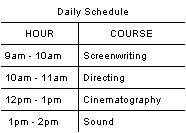
Daily Calendar - Here, you study several topics each day for a fixed amount of time. This approach works great if you have plenty of free time and want to immerse yourself in the material. For example:
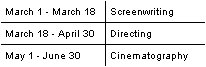
Sequentially - Another approach is to complete each course one at a time, in sequence. For example:
Remember: There is a lot of material! If you feel overwhelmed, give yourself a day or two off. There is NO race to finish. Your goal is to understand the material (and enjoy learning it). The best way to do this to create a regular routine of study.
Certificate Courses
Certificate courses are an upgrade to the standard online courses. In other words, you must already be in an online course to enroll in the certificate program.
To receive a certificate you must (1) complete the online course, (2) take a written exam, and (3) provide a work sample. Course access is limited to three months for individual certificates and two years for the Certificate in Filmmaking. There is no time limit on the exam and work sample requirements.
Exams are made up of short, open-book style essay questions. The practice tests at the end of each course section will help you prepare for the exam. Let us know when you are ready to take the exam and we will email the testing package with instructions.
The Certificate in Filmmaking covers all production areas. When you have completed all of the courses, you will take one comprehensive exam (the exam covers everything except Unleash Your Creativity). Let us know when you are ready and we will email the testing package with instructions.
After passing the exam, a work sample is required. The criteria are as follows (video must be submitted in NTSC format):
Screenwriting - a treatment, step outline, and first 10 pages of an original script OR the first 30 pages of an original script (no treatment and outline).
Directing - a narrative-style film or video showing an understanding of directing actors and camera. Synced dailies are acceptable when accompanied by the shooting script.
Cinematography - a film or video showing the use of lighting setups, ratios, and continuity. Non-sync dailies are acceptable when accompanied by the shooting script.
Sound - a film or video with production sound under various exterior and interior conditions. Synced dailies are acceptable when accompanied by the shooting script.
Editing - an edited film or video showing an understanding of pace, rhythm, continuity, scene construction, and transitions.
Producing - a script breakdown, production board, schedule, and budget for a real or imaginary movie. The script must have a minimum of 20 pages. The first 20 pages of a feature script is acceptable.
Complete Program (Certificate in Filmmaking) - a finished narrative or documentary (including production journal), minimum of 5 minutes in length, as either director or producer.
Certificate courses require a strong commitment since you must take a rigorous final exam and submit a work sample.
After the requirements are met, certificates are shipped via US Priority Mail. Students in the United States receive a tracking number. There is no tracking with this service outside the United States. DHL and FedEx offer international tracking. If you prefer this method, email us a DHL or FedEx label for an 8 ounce stiff envelope after you receive the completion email. It's a bit pricey, but some students prefer it to insure delivery of their certificate.
Please note that fees cannot be refunded after an exam has been graded.
Sharing Your Password
Please don't share your password. Our server can determine if a password is being circulated, and it will result in immediate suspension.
Copyright Information
Film School Online courses are registered with the United States Copyright Office, Library of Congress. The registration number is #TXu 968-574. You cannot reprint, resell, or import this material, in whole or part, without express written permission. Unauthorized use is a violation of the law under Title 17, United States Code; Digital Millennium Copyright Act (DMCA); and TRIPS International Agreement, World Trade Organization. In the event of infringement, the publisher (domain owner), web hosting company (ISP), and associated search engines will be put on legal notice as per the procedures set down in Section 512, DMCA.
Links
Let us know if there are any broken links or information that you feel is incorrect. This is a work in progress and it will develop over time, particularly with constructive feedback.
Copyright © Film School Online!